A technician builds a new harness for a radio installation. Two of its breakouts are the same length, and he builds them in each other's places without checking the drawing. The harness passes its ring-out, because every wire goes where he sent it. At installation one leg reaches for a connector on the wrong side of the bay, and the aft half of the harness is built again.
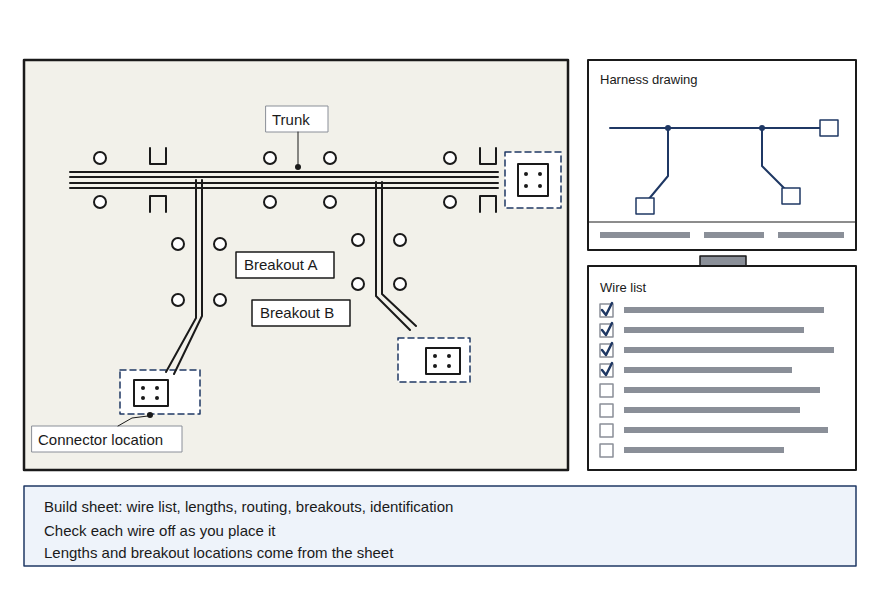
FIG 1 The same harness as drawn and as built. The ring-out passes both.
A harness is a part built to a drawing. Built off its drawing, or without its craft details, it fails at installation or months into service.
Pass
Ring-out
Every wire went where it was sent.
Fail
Installation
One leg could not reach its connector.
Wire harness
A group of wires and cables cut to length, tied together, marked and fitted with connectors, built as one part to a drawing.
Breakout
A point where wires leave the main bundle, called the trunk, to run to their own connector.
Ring-out
A check of every wire with an ohmmeter, power off, against the wire list.
Learning Objectives
When you finish this lesson you can do the four things below. The check at the end asks about each of them.
1BuildBuild a harness from its drawing and build sheet in the sheet's order, and stop when the sheet is wrong.
2TerminateTerminate each conductor to the drawing and the tool's data plate: strip, crimp, inspect, pull test a sample, insert and tug.
3DressTie, relieve strain, leave service loops and mark a harness to AC 43.13-1B.
4InspectInspect a finished harness, ring it out, and choose an approved repair, with the manufacturer's data first.
The Job in Order
Drawing
Cut
Terminate
Dress
Inspect
Ring out
Lecture Video
Watch the lecture. Continue appears when it ends. You can skip it for now and come back to this page later. The lecture runs 5:06.
Crimped Joints
Nearly every wire in a harness ends in a crimp, so start with what Terminations and Bonding taught. A crimp is a joint made by squeezing a metal barrel onto the wire strands until barrel and strands become one gas-tight piece of metal, with no gaps for air or moisture.
FIG 2 Two crimped barrels cut across: gas-tight, and worked loose.
From Terminations and Bonding
A crimp works loose in service, and the wire moves in the barrel each time the airframe flexes. What happens at the joint?
The documents
The Harness Drawing
A harness is built to a drawing, and the drawing is the authority for every wire, pin and dimension in it. This is the drawing for the harness you build on the Harness Bench: AEA CAET 1, revision 1, an interconnect harness between two 15 pin connectors, P1 and P2.
Select a part of the drawing to look closer and read what it shows.
Select a part of the drawing.
Drawing: AEA CAET 1, revision 1, Wiring Diagram, Interconnect Harness, as drawn in the Harness Bench.
Build what the drawing says. Do not invent a better route, a shorter leg or a neater breakout. The design accounts for clearances you cannot see on the bench.
The documents
The Work Order and the Build Sheet
The work order says what to build and what to build it with. The build sheet, the drawing and its wire list, says how. You build what they say, and you check each wire off as you finish it.
WORK ORDER 26-0417
Interconnect harness, P1 to P2
Select a line to read why it is there.
The drawing is the authority for this job.
Lengths are finished lengths, with the slack the design intends. A cable cut short cannot be stretched; you cut a new one.
The work order lists every part. The drawing tells you which one goes on each end.
The tool and its positioners are named, so the setting comes from their data plates, not from memory.
Where the drawing does not cover a point, AC 43.13-1B gives the accepted practice.
What the Build Sheet Controls
Wire listThe gauge, type and color of every wire, so the choice of wire is already made.
LengthsThe finished length of each run, with the slack the design intends.
RoutingThe path each wire takes through the harness.
BreakoutsWhere each leg leaves the trunk. One in the wrong place cannot reach its connector.
IdentificationThe marking each wire carries.
Wire list
The table on the build sheet that gives every wire's number, gauge, type, color and its two ends.
On the job
Partway through the build, the wire list sends the POWER OUT lead to P2 pin 8, and the routing note on the same sheet sends it to pin 9. What do you do?
CautionIf the build sheet is wrong, incomplete or contradicts itself, stop and get it corrected through the proper channel. Building to a known bad sheet makes a part no record can explain.
The documents
The Order of the Work
Read the whole drawing and build sheet before you cut anything. Then work in the order the sheet gives, and check each wire off the wire list as you place it. A fifty wire harness is not a memory exercise.
FIG 3 A build board is a flat board with pegs and connector holders laid out to the drawing, so the harness is built to its real shape.
Select the steps in the order you do them.
One conductor
One Conductor, Start to Finish
Before you build, watch one conductor of the CAET 1 harness done right: a white 22 AWG wire that lands in P2 pin 8, from the stripper to the seated contact. The demonstration has a narrator and captions, and you can pause it or step through it. The pages after it take each step in turn.
Loading the demonstration
Demonstration: the Harness Bench, Avionics Circuit Lab. 3D models of the DMC AFM8 crimp tool, the K13-1 positioner, the M39029/63-368 socket contact, the 22 AWG wire and the stripper. It runs 3:27. Open the demonstration in the Harness Bench.
M22759/16
The specification number of the wire the drawing calls for, printed on the wire itself.
One conductor
Cutting and Stripping
Cut each cable to the length on the work order, 18 in for every CAET 1 cable. Then strip each conductor end to the length on the drawing, 0.17 in. The strip length is the length of bare conductor left when the insulation is removed.
Strip a 22 AWG Wire
Choose the blade hole, set the length stop, then strip.
Choose a blade hole first.
Slug
The cut piece of insulation the stripper pulls off the end.
Lay
The twist the strands were made with. A good strip leaves every strand in its lay.
Nicked strand
A strand cut partway through. A broken strand is cut all the way through.
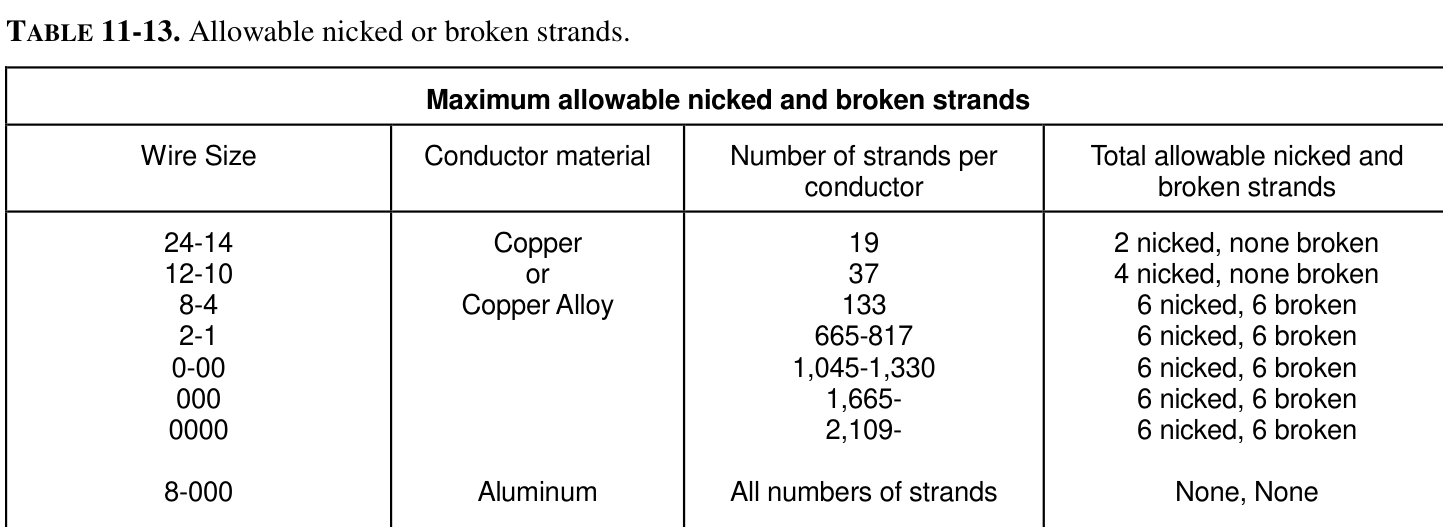
FIG 4 Table 11-13, the limit on nicked and broken strands. Source: AC 43.13-1B, Table 11-13.
AC 43.13-1B, the FAA's book of acceptable methods for aircraft inspection and repair, limits the damage. For copper wire from 24 to 14 AWG with 19 strands, such as this 22 AWG wire, it allows at most 2 nicked strands and none broken. If your strip shows a broken strand, or more nicks than that, cut the end back and strip again.
One conductor
Contacts and Their Color Bands
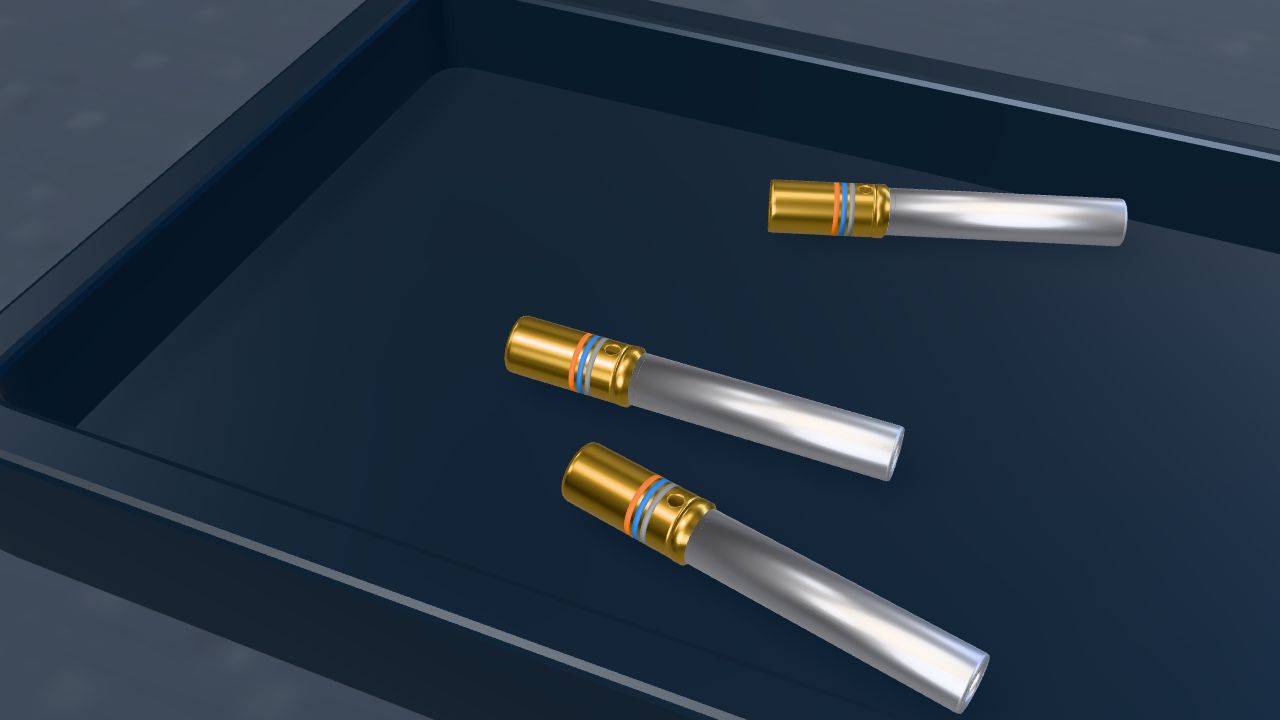
A contact is the metal pin or socket crimped on a wire end and pushed into a connector. P1 is male and high density, so it takes pins. P2 is female and standard density, so it takes sockets. Each contact carries its part number in three color bands on its wire barrel, the hollow end the wire goes into.
Loading the 3D model
Drag to turn the contact. Pinch or scroll to look closer. Select a part to read what it does.
Select a part to read what it does.
M39029
The military specification for these crimp contacts. The number after the slash names the contact family, and the dash number names the contact.
BIN
The Basic Identification Number: the contact's three digit dash number, 368 in M39029/63-368, printed as three color bands read from the wire barrel end toward the mating end.
Read the Bands
The color code gives one digit per color: 0 black, 1 brown, 2 red, 3 orange, 4 yellow, 5 green, 6 blue, 7 violet, 8 gray, 9 white.
Read the bands on this contact, from the wire barrel end. Select three colors.
firstsecondthird
Contact
Where
Size, wire
Bands
M39029/58-360
P1, high density, male
Pin, size 22D, 22 to 28 AWG
orange, blue, black
M39029/57-354
High density, female (not on this harness)
Socket, size 22D, 22 to 28 AWG
orange, green, yellow
M39029/64-369
Standard density, male (not on this harness)
Pin, size 20, 20 to 24 AWG
orange, blue, white
M39029/63-368
P2, standard density, female
Socket, size 20, 20 to 24 AWG
orange, blue, gray
Sources: the Harness Bench contact data (DMC contact chart and tool search, Glenair AS39029 guide); the color code is MIL-STD-1285C, Table II. The bands read from the wire barrel end (DMC).
One conductor
Setting Up the Crimp Tool
The DMC AFM8 crimp tool, M22520/2-01, crimps these contacts. A positioner fitted in its head holds the contact under the four indenters, the jaws that press the barrel, and the selector sets how far the indenters close. Read both from the positioner's data plate, never from memory.
FIG 5 The K13-1 positioner's data plate. Select a part of it.
Select a part of the plate.
Positioner
The part fitted in the crimp tool's head that holds the contact under the indenters. It is chosen by the contact.
Selector
The numbered knob that sets how far the four indenters close. It is set by the wire size.
Set Up the Tool
Positioner
Selector
Choose a positioner.
The K42 plate row for M39029/58-360, the P1 pin
Wire size
22 AWG
24 AWG
26 AWG
28 AWG
SEL
4
3
2
1
Data plates as DMC's envelope drawings show them: K13-1-ENV rev 4, K42-ENV rev 6, K41-ENV rev 6 (dataplates updated March 20, 2020). The tool's own plate always governs.
One conductor
The Sample Pull Test
A pull test proves the tool setup before you crimp the harness. You crimp a sample on a scrap of the same wire, with the same contact, tool, positioner and selector, and pull it apart on a pull tester. The test destroys the sample, so it is scrapped and never installed.
Pull a Sample
The sample is an M39029/63-368 socket on 22 AWG wire, crimped in the K13-1. Choose the selector it was crimped at, then pull. MIN marks the minimum force your data gives.
Choose a selector setting.
Pull test
A destructive test that pulls a crimped sample until it holds past the minimum force or fails.
Retention tug
A light pull on a wire after its contact is seated in the connector, to prove the contact locked. It is not a pull test.
Pull test a sample as often as your data calls for, made with the same wire, contact, tool, positioner and setting as the job.
One conductor
Crimping and Inspection
Drop the contact into the positioner, feed the stripped end into the barrel until the insulation meets the barrel end, and squeeze through one full stroke. The ratchet, the toothed catch in the handles, will not let them open until the indenters bottom out, so every crimp gets the full stroke.
NEVER INSTALL A CRIMP YOU HAVE NOT INSPECTED.
FIG 6 A crimped socket and its four inspection checks. Select a check.
Accept or Reject
Accept
Passes all four checks.
Tap the bucket where the card belongs. On a computer you can also drag the card.
Reject
Fails a check. Cut it off and do it again.
Accept or reject this crimp?
One conductor
Inserting the Contact
Contacts go into the connector from the rear, the wire side, with the insertion tool made for the contact: red and white M81969/1-02 for the size 20 contacts in P2, green and white M81969/14-01 for the size 22D contacts in P1. Lay the wire in the tool's slot, line the contact up with its cavity, the hole it goes in, and push straight in until it clicks into its retention clip.
Seat the POWER IN 1 Lead
The rear of P2, as you hold it to insert contacts, numbered as molded on the insert. The drawing lands POWER IN 1 in pin 8.
Select the cavity the drawing gives for POWER IN 1.
Retention clip
The spring fingers in each cavity that lock behind the contact's retention collar.
The harness
Shield Preparation
A shielded cable has a braided metal shield around its conductors, under its jacket, the outer insulation. At each end you cut back the jacket, leave a short window of shield, and join a drain lead to it with a solder sleeve. Detail A on the drawing gives every dimension.
FIG 7 A shielded cable end prepared to Detail A, one step at a time.
Jacket
The outer insulation over the shield of a cable.
Braid
The woven metal strands that make up the shield.
FIG 8 Detail A as it appears on the drawing AEA CAET 1. Dimensions in inches.
A splice joins wires end to end in a crimped barrel. AC 43.13-1B paragraph 11-167 sets where a splice may go. Select each part of the real paragraph to read what it means.
Select a paragraph to read what it means.
Paragraph 11-167 and subparagraph a
Splicing is allowed if it does not hurt the wiring's reliability. Splices on power wires, coax, databus (the AC calls it multiplex bus) and large wire need approved data, meaning data the FAA has approved. Keep splices few, keep them out of high vibration, and put them where they can be inspected.
Subparagraph b
Use a self-insulated splice, one with its own insulating sleeve. A bare splice needs plastic sleeving secured at both ends.
Subparagraph c
No more than one splice in a wire segment between two connectors, except to join several wires to one, to change wire size to fit a contact, or in an approved repair.
Subparagraph d
Stagger the splices in a bundle so the bundle does not grow at one spot. Figure 11-18 shows it.
Subparagraph e
No splice within 12 in of a termination device, a connector or terminal strip where wires end.
Subparagraph f
Except: a splice within 12 in is allowed to join several wires to one, or to change the wire size to fit a contact barrel.
Figure 11-18
Four splices in one bundle between two clamps, each clear of the next, so the bundle stays the same size.
The Splices on CAET 1
At S1 the POWER OUT wire splits into two 22 AWG leads for P2 pins 8 and 9, close to P2. Subparagraph f allows that: it joins several wires to one. The Harness Bench uses an M81824/1-1 crimp splice, red, for 26 to 20 AWG, chosen by the copper on each side.
Approved data
Data the FAA has approved for a repair or alteration, such as a manufacturer's approved repair or an engineering approval.
Source: AC 43.13-1B CHG 1, paragraph 11-167 and Figure 11-18.
The harness
Lacing and Ties
Lacing cord and ties hold the wires of a bundle together so they cannot move against each other and rub. The drawing sets their spacing and tension; where it is silent, AC 43.13-1B paragraph 11-158 gives the accepted practice.
Tighten a Tie
LooseTight
Check your own ties two ways. Look at the jacket where the tie crosses it: no biting dent. Then try to slide the bundle under the tie: it does not move.
12 in
Ties
Use ties where the supports are more than 12 in apart.
1 in
Lacing
Single cord lacing on bundles 1 in across or less; double cord on larger ones.
120 °C
Plastic straps
Only where the temperature stays at or below 120 degrees Celsius.
Select a paragraph to read what it means.
Paragraph 11-158
Ties, lacing and straps hold wire groups together for maintenance, inspection and installation. Plastic straps are kept out of wheel wells and areas near wing flaps or wing folds, out of high vibration areas, and out of sunlight unless they are made for it.
Subparagraph a
Lace wire groups inside junction boxes and other enclosures. Single cord lacing on bundles 1 in across or less, double cord on larger ones.
Subparagraph b
A tie is a clove hitch, a knot of two turns around the bundle, secured by a square knot. Use ties where the supports for the wire are more than 12 in apart.
Figure 11-17
Making a tie: wrap the cord twice over the bundle, then finish with a clove hitch and a square knot.
Lacing cord
Braided tape or cord tied around a bundle, as continuous lacing or single ties.
Clamp
A cushioned metal strap screwed to structure that supports the bundle. Clamps are primary support; ties are not.
Ties, tape and cord are never primary support. Clamps hold the bundle, at intervals of not more than 24 in.
Source: AC 43.13-1B CHG 1, paragraphs 11-96a and o.
CautionA tie gun set too high, or ties pulled with pliers, dent the outer wires of a bundle. Set the gun to the specification and check it on a sample bundle first.
Source: AC 43.13-1B CHG 1, paragraph 11-158 and Figure 11-17.
The harness
Strain Relief and Service Loops
Contacts are electrical parts, not structural ones. Strain relief, usually the backshell clamp at the back of the connector, takes any pull on the bundle and passes it to the connector body. A service loop is slack left on purpose, so a unit can slide out of its mounting and its connector can be unlocked and worked on.
Slide the Radio Out of Its Rack
Backshell
The metal hood screwed to the back of a connector. Its clamp grips the bundle so a pull goes to the connector body, not to the contacts.
Bend radius
How tightly a bundle is bent, measured as the radius of the curve. A smaller radius is a sharper bend.
Select a paragraph to read what it means.
Paragraph 11-136
Use only string ties or plastic straps on a service loop harness. Put a 90 degree or Y spot tie at the breakout, and ties every 4 to 6 in along the loop.
Paragraph 11-138
Strain relief at the termination supports the loop where it meets the connector: a strain relief adapter, a heat shrink boot or a length of heat shrink tubing.
Paragraph 11-139
The primary support of a service loop is a cushion clamp and the connector itself.
Subparagraph a
The loop is long enough that the unit can come out far enough to turn and unlock its connector. Usually 3 to 6 in is enough.
Subparagraph b
Tie the breakout point. Keep a bend radius of at least 3 times the harness diameter. Put the breakout behind, beside, below or above the unit. No plastic ties between the breakout and the connector where they can chafe the wires next to them.
Subparagraph d
Strain relief at the termination, normally the connector maker's backshell, a heat shrink boot or tubing.
A Shop Case
A unit had been removed and reinstalled several times with no service loop. Each re-termination used up a little wire, and the last technician installed the connector under tension. Every time the airframe flexed, two contacts were pulled, and the unit showed intermittent data errors.
CautionNever let a connector hang on its wires, on the bench or in the airplane. The weight is carried by the contacts, and the damage does not show until the joint is already failing.
Source: AC 43.13-1B CHG 1, paragraphs 11-135 to 11-139.
The harness
Identification Markers
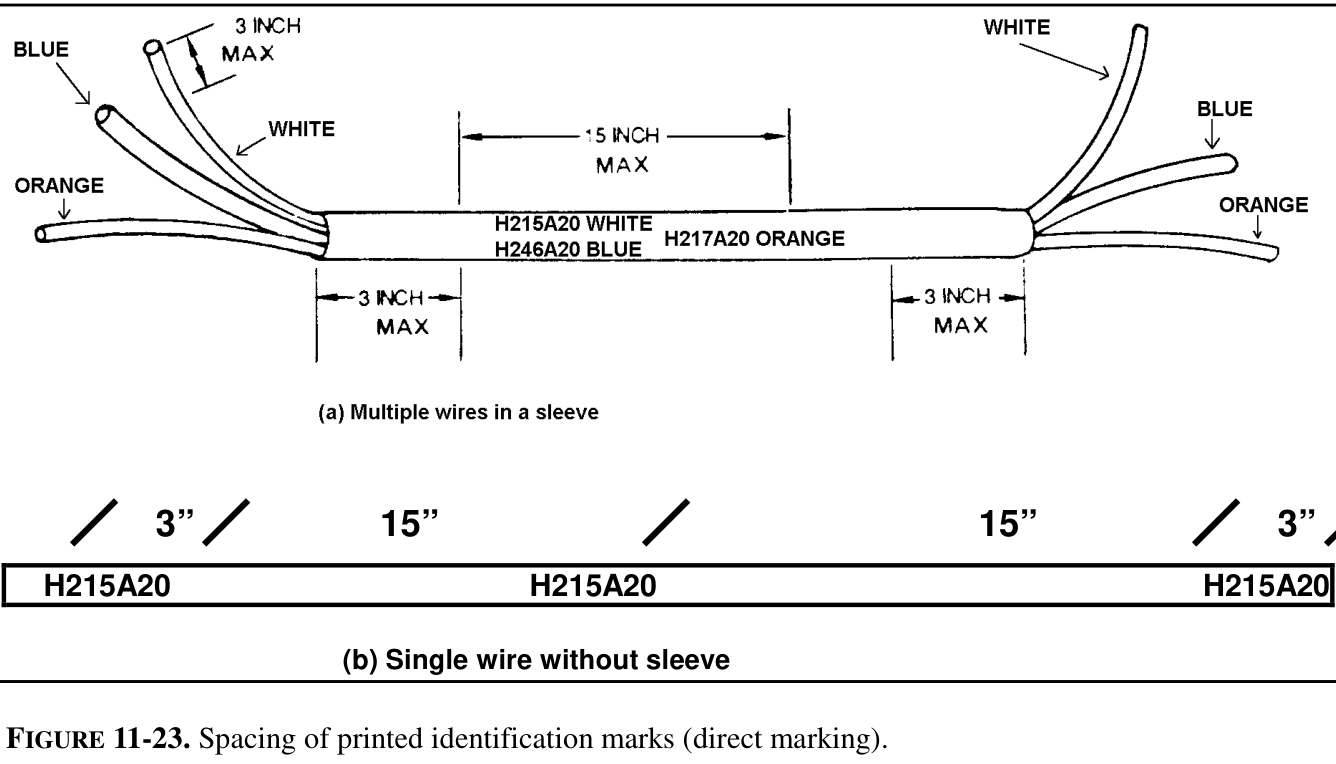
Once a harness is installed, only a short piece of it shows in an access bay, so every wire is marked along its length, not only at its ends. AC 43.13-1B paragraph 11-208 places a mark at each end and at intervals of not more than 15 in.
Mark a 40 in Wire
Select the wire to place a mark, or select a mark to take it off. Then check.
FIG 9 Spacing of printed identification marks. Source: AC 43.13-1B, Figure 11-23.
Select a paragraph to read what it means.
Paragraph 11-208
Marks go at each end of a wire and at 15 in or less along it. A wire under 3 in long needs no mark; one 3 to 7 in long gets a mark near its center. Place marks so no tie or clamp has to come off to read them, printed to read left to right or top to bottom.
Subparagraph b
Indirect marking is a printed sleeve, a heat shrink sleeve with the code printed on it, at each end and at least every 6 ft. The wires inside a cable are marked within 3 in of their ends.
The caution in 11-205
Never use metal bands in place of insulating sleeves. Take care marking coax or databus cable: squeezing it can change how it carries a signal.
Identification sleeve
A short plastic sleeve printed with the wire's code, slid over the wire and shrunk or tied in place.
Both ends
Coax
Coaxial cable is identified at both equipment ends (11-96gg).
Source: AC 43.13-1B CHG 1, paragraphs 11-205, 11-208 and 11-96gg, and Figure 11-23.
Inspect and repair
Inspecting the Finished Harness
Inspect the finished harness end to end against the drawing and the AC 43.13-1B inspection list in paragraph 11-96. Then ring it out with the power off.
Find the Six Faults
Select anything on the harness that looks wrong. Found 0 of 6
Select a part of the harness.
Then Ring It Out
Point to point
Each wire reads a fraction of an ohm end to end, checked against the wire list.
Isolation
Each wire reads OL, the meter's over limit display meaning no path, to every other wire and to its shield.
A ring-out proves paths. It cannot find a breakout built in the wrong place. Wiring Inspection and Troubleshooting takes the ring-out further.
Inspect and repair
Approved Repairs
When inspection finds damage, the repair comes from the data in a fixed order. The manufacturer's data comes first: the maintenance manual, the installation manual, the harness drawing and the instructions with the equipment. AC 43.13-1B, the accepted practice, applies only where that data is silent.
When the Wire Is Replaced
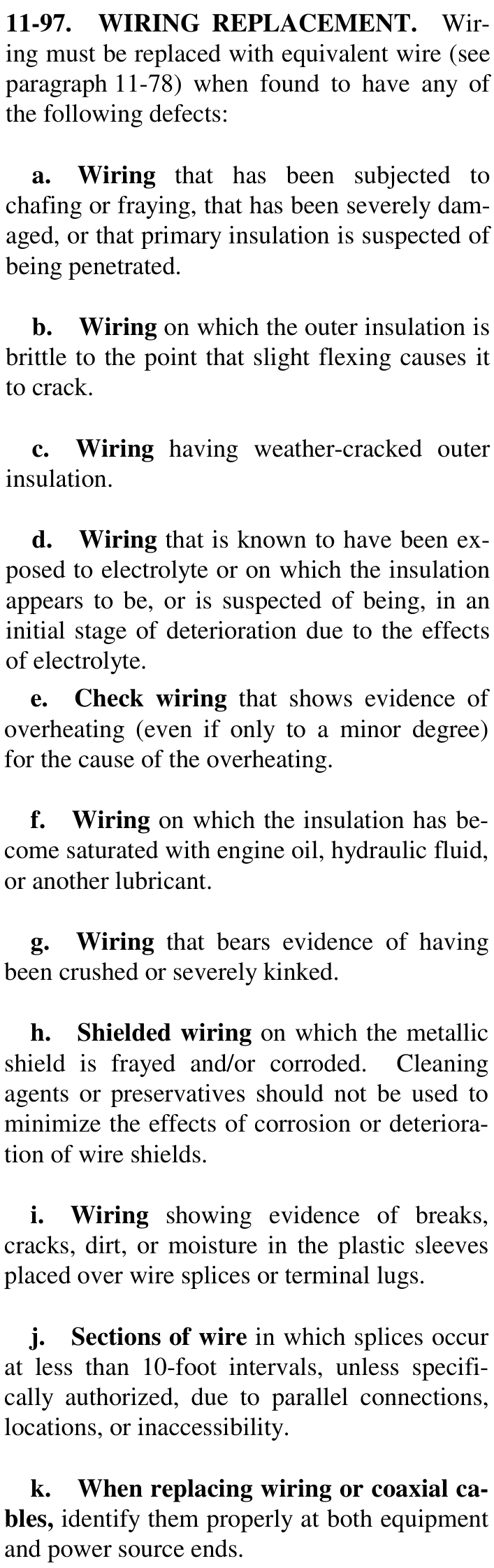
AC 43.13-1B paragraph 11-97 lists the damage that means the wire is replaced. Select a card to turn it over.
Equivalent wire is wire the maintenance manual approves for the job. If the manual names no substitute, ask the aircraft manufacturer. Mark the new wire at both ends.
Source: AC 43.13-1B CHG 1, paragraph 11-97k and l.
CautionDo not use AC 43.13-1B to justify a method the manufacturer's data covers differently.
Hands on
Build the CAET 1 Harness
Now build the whole harness on the Harness Bench, a full screen application in the Avionics Circuit Lab. You read the work order and the drawing, build all twelve cable ends, ring the harness out with a meter, find and repair a fault the bench plants, and sign the job off.
Before you open the bench
Your first cable is the ARINC 429 pair, 24 AWG, and you start at P1. What does the data plate give you?
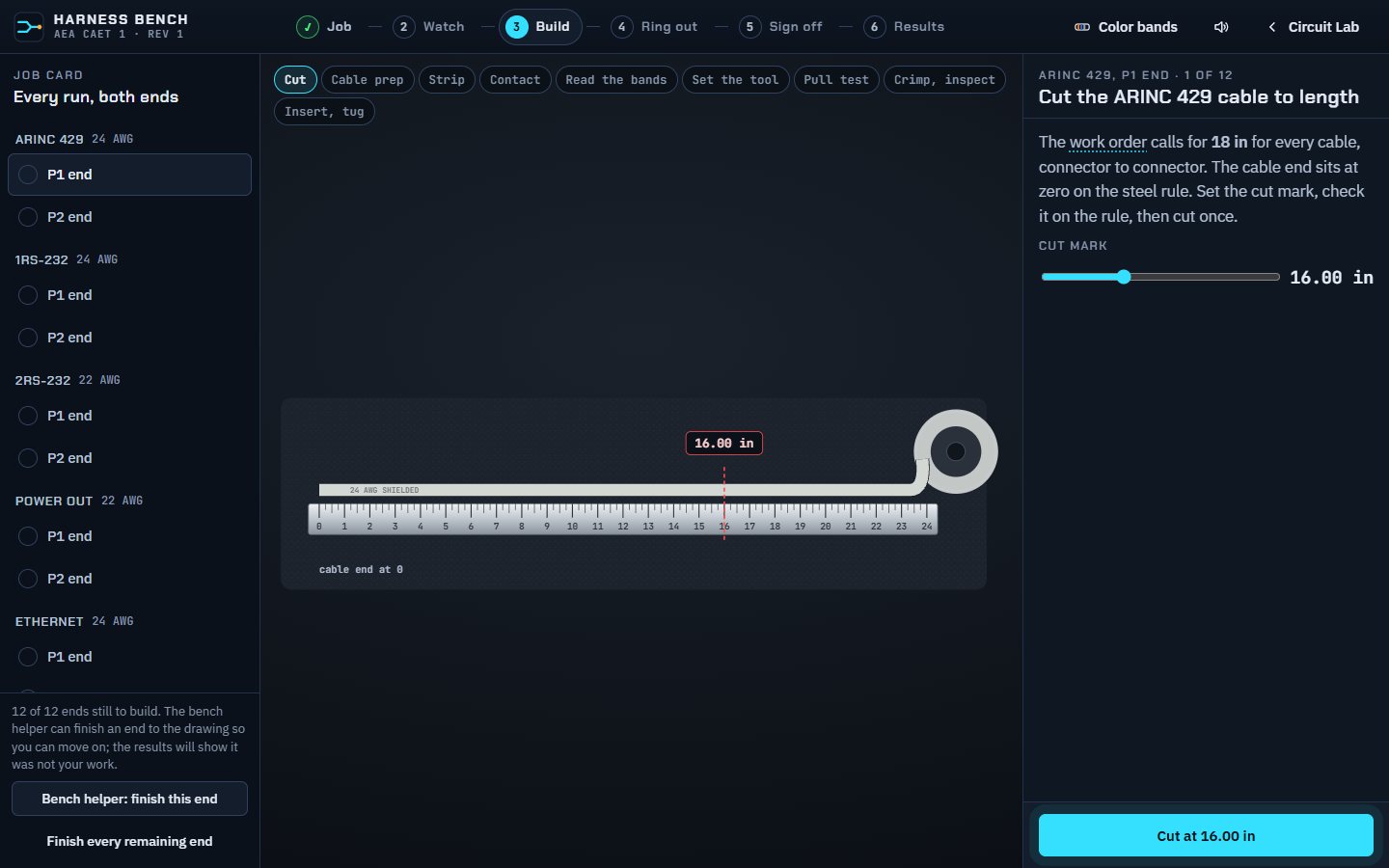
FIG 11 The Harness Bench, build stage.
1JobRead the work order and the drawing.
2WatchThe narrated demonstration.
3BuildAll twelve cable ends, step by step.
4Ring out90 checks with the meter, then a fault hunt.